
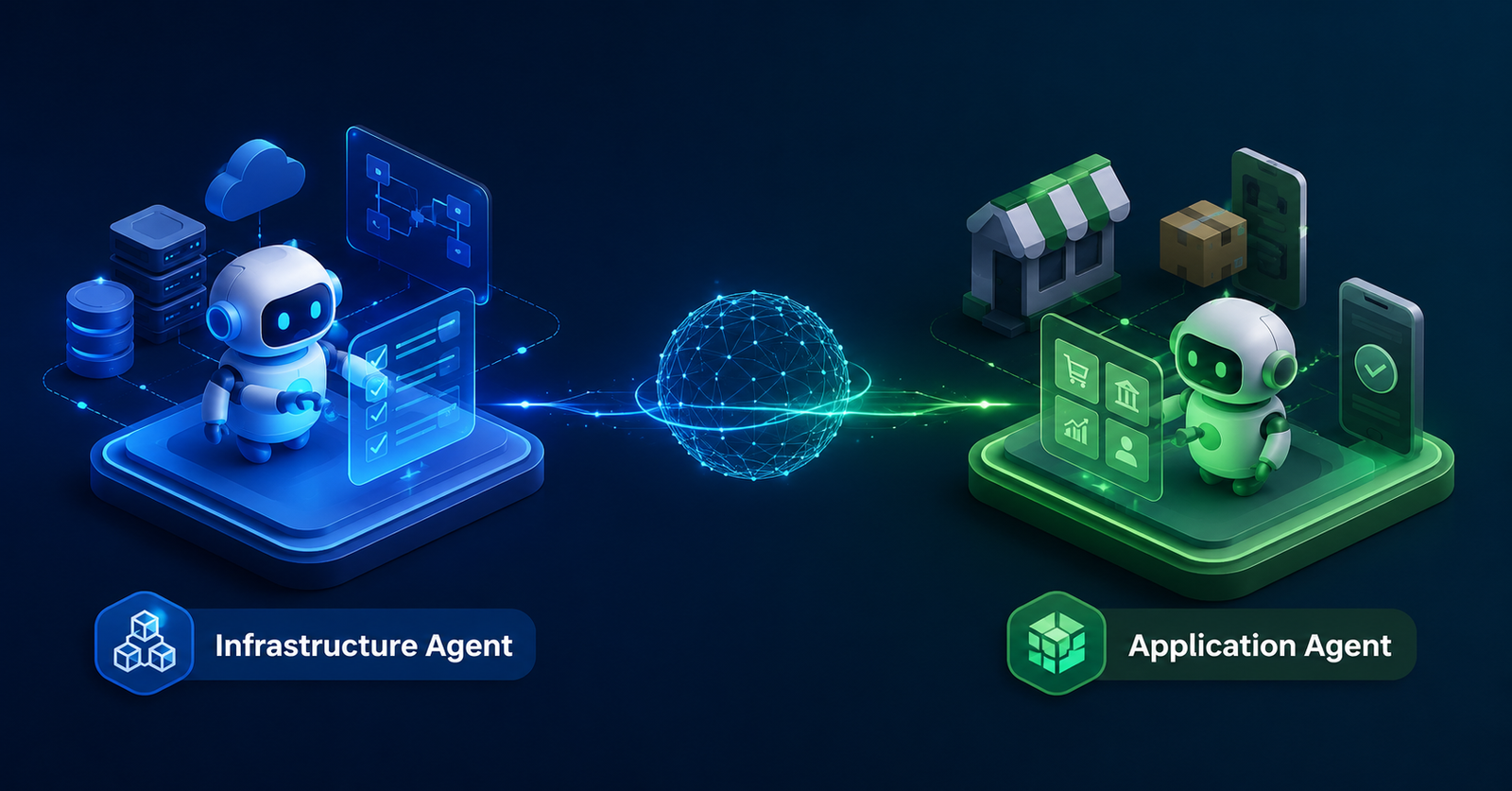
I already had an Infrastructure Agent working. It could provision the Beckn foundation: registry, gateway, ONIX adapter, and cloud infrastructure on AWS or GCP, using either VM or Kubernetes based deployments. It also validated registry key consistency before declaring the deployment healthy.
That solved only half the problem. The network existed, but nothing useful was running on it yet. Every time my manager wanted to test a new business use case, like wealth products, savings products, or lending products, I still had to define BAP and BPP apps by hand, build product catalogs, wire up broker connectivity, and hand-write Beckn search and on_search payloads for that exact use case. It worked once or twice, then became obvious that this didn’t scale.
The split that made the tool make sense
The cleanest way I found to explain the split was this:
The Infrastructure Agent creates the Beckn network. The Application Agent creates the business participants and products that run on that network.
That distinction matters because the failure modes are different. Infrastructure automation has to care about registry, gateway, adapter, cloud shape, keys, and deployment health. Application generation has to care about intent, participants, catalogs, broker connectivity, and protocol payloads that prove a business flow can actually be tested.
If I kept those responsibilities in one tool, the interface would have become blurry. A network deployment intent and a savings-product intent don’t want the same model. They don’t fail for the same reasons either. One is asking, “Is my network reachable and correctly wired?” The other is asking, “Can this use case be discovered, represented as a catalog, and exercised through Beckn messages?”
The Application Agent supports these use cases today:
wealth-fixed-income
savings-hourly-interest
lending-against-equity
lending-against-crypto
custom
That list is intentionally small. For a POC, I wanted enough variety to prove the generator wasn’t hard-coded to one catalog shape, but not so much surface area that the tool became a framework before it became useful.
What the application agent generates
The Application Agent takes a use-case intent and renders the artifacts needed to test it end to end:
catalog.json
beckn-search.json
beckn-on_search.json
participant-app-map.yaml
connectivity-plan.yaml
api-contracts.json
USER_GUIDE.md
Each file exists because I had previously been creating some version of it manually.
catalog.json is the business content. For a wealth use case, that means fixed-income products and their attributes. For a savings use case, it means savings products with hourly interest behavior. The catalog is where a use case stops being an abstract conversation and becomes something a BPP can expose.
beckn-search.json gives me a ready search request for the BAP side. beckn-on_search.json gives me the expected response shape from the BPP side. These two files are especially useful because discovery is usually the first proof that a new use case has been wired correctly. If search and on_search don’t line up, nothing downstream is worth debugging yet.
participant-app-map.yaml defines the BAP and BPP apps for the use case. This is the part I don’t want to rediscover every time someone says, “Can we test lending against crypto instead?” The participants change, their roles change, and the product shape changes, but the generator can keep the structure consistent.
connectivity-plan.yaml captures how the apps are expected to connect through the broker and network. It is not the same thing as running infrastructure, but it gives a concrete plan for the application-level wiring that needs to exist on top of the already deployed foundation.
api-contracts.json records the expected API contracts for the generated app layer. That gives me something inspectable before anything becomes runtime behavior. The USER_GUIDE.md is there for the human path: what was generated, where it lives, and how to try it.
The workflow I wanted
The core workflow is simple: create an intent, validate it, render artifacts, then verify the generated catalog.
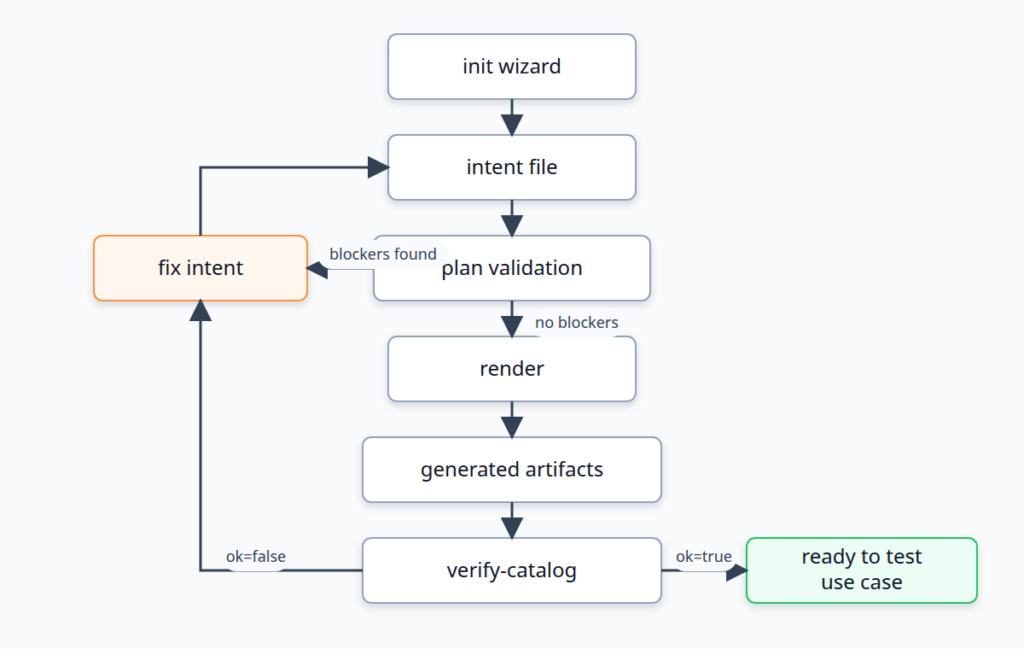
The important part is that plan runs before generation. I don’t want a tool that happily writes seven files and only then admits the input didn’t make sense. Validation belongs before render, because bad generated artifacts are worse than no generated artifacts. They look official enough to waste time.
The commands
The first command is the interactive wizard. It creates a new intent file for a use case:
python3 -m tools.app_agent init --output application-intents/savings-hourly-interest.yamlThat gives me a structured starting point instead of asking me to remember the schema every time. For a new use case, the wizard is the right entry point because it captures the business intent before any catalog or payload exists.
Once I have an intent, I run plan:
python3 -m tools.app_agent --intent docs/agents/beckn-application-agent/sample-wealth-intent.yaml planThe plan step validates the intent before generating anything. When I first built this, the plan showed no blockers for the sample wealth intent. That was the first useful signal: the input model had enough information to produce a coherent application layer.
Then I render the artifacts:
python3 -m tools.app_agent --intent docs/agents/beckn-application-agent/sample-wealth-intent.yaml --out generated/wealth-app renderThat command generated seven artifacts:
catalog.json
beckn-search.json
beckn-on_search.json
participant-app-map.yaml
connectivity-plan.yaml
api-contracts.json
USER_GUIDE.md
[IMAGE: Terminal screenshot showing the full render command output for python3 -m tools.app_agent --intent docs/agents/beckn-application-agent/sample-wealth-intent.yaml --out generated/wealth-app render, including the list of 7 generated artifacts.]
Finally, I verify the generated catalog:
python3 -m tools.app_agent --intent docs/agents/beckn-application-agent/sample-wealth-intent.yaml verify-catalogThe first build returned ok=true, which was enough for the POC stage. It meant the generated catalog matched the intent closely enough to move into protocol-level testing. At that point, the tool had crossed the line from “nice script” to “something I can hand a repeatable use case to.”
The initial test run gave me another sanity check: 3 tests passed. That wasn’t broad coverage, but it covered the basic contract of the agent at the time: plan, render, and catalog verification behaved as expected.
Why use-case-driven generation beat hand-written payloads
Hand-writing Beckn payloads per use case is fine when the goal is to understand the protocol once. It becomes a drag when the goal is to compare use cases quickly.
A wealth catalog and a savings catalog may both go through discovery, but they don’t describe the same product concepts. Lending against equity and lending against crypto are close enough to feel related, yet different enough that copy-paste becomes risky. The tedious bugs are usually small: a participant name that didn’t change, a provider id that no longer matches, a payload field that still reflects the previous use case.
The intent file gives me one place to describe what the use case is supposed to be. The generator turns that into all the downstream files that need to agree with each other. That is the main value. It is not just faster than typing JSON. It reduces the number of places where I can accidentally create a believable but inconsistent demo.
Adding AI-assisted debugging without making it the whole tool
The next problem showed up after the generator existed. Once the use case changed, say from savings products to a grocery catalog use case, I still had to inspect the intent file, generated catalog, participant map, and payloads to understand what didn’t match or what needed to change.
So I added an ai-debug command:
python3 -m tools.app_agent --intent <intent.yaml> ai-debug "your question"The default behavior is dry-run. It prints the full prompt and local context without calling any API. That was a deliberate choice. This tool is going to read use-case intent, generated payloads, and application mapping details. Even in a POC, I don’t want that leaving the machine just because someone tried a debugging command.
A live call requires --execute:
python3 -m tools.app_agent --intent <intent.yaml> ai-debug "Customize this use case" --web-search --executeThe first version was tied to OpenAI Responses. That was useful, but too narrow for an internal tool. I changed it to use a provider adapter layer with support for openai-responses, openai-chat, and ollama. Configuration is controlled through:
APP_AGENT_LLM_PROVIDER
APP_AGENT_LLM_MODEL
APP_AGENT_LLM_ENDPOINT
That made local model debugging possible through Ollama while keeping hosted models available when needed.
I also made web search provider-gated. Right now, only openai-responses supports it. If someone requests --web-search with an unsupported provider, the command rejects it instead of silently ignoring the flag. Silent fallback is a bad debugging experience because it makes the user think the model had external context when it didn’t.
After this work, the tests went from 5 to 7, verified with:
python3 -m unittest tools.app_agent.tests.test_agentThat felt like the right level of coverage for the adapter behavior in a POC. The goal wasn’t to exhaustively test every provider API. It was to make sure provider selection, dry-run behavior, and unsupported web search handling didn’t regress.
What’s still rough
tools/app_agent/ is currently untracked in the repo, along with some other existing untracked content. That is fine for the POC stage, but it is not a state I would want to leave ambiguous before asking someone else to build on it.
The prompt context for ai-debug is also not redacted before hosted calls yet. Dry-run being the default reduces the chance of accidental leakage, but it doesn’t solve the hosted-call path. Before this becomes a normal workflow, the tool should have a clearer redaction step or at least a stricter review mode for what gets sent.
The provider contract is still thin. openai-responses, openai-chat, and ollama are enough to prove the adapter shape, but the abstraction will probably need sharper boundaries around tool support, streaming, model capability flags, and error reporting. I don’t want every provider difference leaking into the command layer.
The practical win is already there, though. I can create a use-case intent, validate it, generate the app-layer artifacts, verify the catalog, and then ask targeted debugging questions against the same local context. The infra agent gives me the network foundation. The application agent gives me something meaningful to run on it.
FAQ
Why split infra and application agents instead of building one tool?
Because they solve different problems. The infra agent provisions registry, gateway, ONIX adapter, cloud resources, and deployment health. The application agent defines BAP apps, BPP apps, product catalogs, broker connectivity plans, and Beckn payloads for a specific business use case.
Why generate payloads per use case instead of hand-writing them?
Hand-writing works for one demo, but it breaks down when the use case changes repeatedly. A generator keeps the catalog, participant map, connectivity plan, and search plus on_search payloads aligned from the same intent.
What does plan validate before render?plan validates the intent before any artifacts are generated. The point is to catch blockers while the source intent is still the only thing being changed, instead of producing a folder full of inconsistent output.
What does verify-catalog check?
It checks that the generated catalog matches the intent closely enough to be useful for testing. In the first build, catalog verification returned ok=true for the sample wealth intent.
Why does ai-debug default to dry-run?
Because the command includes local intent and generated artifact context in the prompt. Dry-run lets me inspect exactly what would be sent before any hosted API call happens.
How does a new use case get added?
The usual path starts with the wizard: python3 -m tools.app_agent init --output application-intents/savings-hourly-interest.yaml. From there, the intent can be planned, rendered, and verified using the same command flow as the sample wealth intent.
Why support Ollama as well as OpenAI providers?
Local models are useful when the debugging context should stay on the machine. Hosted providers are still useful when stronger model capability or web search is needed, but that should be an explicit choice.
What are the exact guardrails, provider rules, and internal flow this agent runs on?
That level of detail goes beyond what’s useful in a public post, since it touches specific validation rules, provider contracts, and internal decision points built for this setup. If you’re evaluating something similar for your own Beckn network or want to walk through the exact architecture, reach out through https://www.clearleaff.com/contact-us and we can get into the specifics.
References
- Beckn protocol documentation: https://developers.becknprotocol.io/docs/introduction/beckn-protocol-specification/
- Beckn documentation index: https://developers.becknprotocol.io/documentation/
- Beckn Application Platform APIs: https://developers.becknprotocol.io/docs/core-specification/core-apis/beckn-app/
- OpenAI API documentation: https://platform.openai.com/docs
- OpenAI Responses API guide: https://platform.openai.com/docs/guides/responses
- Ollama API documentation: https://docs.ollama.com/api/introduction