

Let’s be honest: traditional tech onboarding is breaking. Reading documentation cover-to-cover or grinding through 40-hour video courses just does not work when tools, frameworks, and APIs evolve every few months. If you want to keep up without burning out, you need a way to adapt to any technology with AI coding agents at speed.
Instead of getting stuck in passive tutorial loops, modern engineers use tools like Claude Code, Cursor, and GitHub Copilot as interactive tech leads. By combining the Pareto Principle (the 80/20 rule) with prompt-driven execution, you can compress months of framework onboarding into a few focused days. Here is the exact blueprint to build your own 80/20 Learning Engine.
Understanding the Core 20% Rule
Whether you are picking up a new frontend framework, learning Rust, or configuring a cloud database, you do not need to master everything at once. About 80% of any software tool comes down to four basic concepts:
- State & Data Flow: How data enters, moves through, and leaves the app.
- Lifecycle & Execution: Sync vs. async processing, request/render loops, and scope.
- Core APIs & Routing: How components or endpoints talk to each other.
- Error Handling: How the system catches, logs, and recovers from bugs.
Get comfortable with these four pillars in any stack, and you can start building real-world projects right away.
| Learning Approach | Focus & Time Investment | Typical Outcome |
| Traditional Learning | Read docs cover-to-cover (80% Time -> 20% Execution) | Slow onboarding, passive retention, tutorial fatigue |
| The 80/20 Engine | Target Core 4 Pillars via AI Agent (20% Time -> 80% Output) | Rapid mental model, active building, fast retention |
How to Adapt to Any Technology with AI Coding Agents: The 3-Step Blueprint
Step 1: The Rosetta Stone Prompt (Mental Model Mapping)
Think of a Rosetta Stone Prompt as a concept translator. Just as the historical Rosetta Stone used known languages to decode unfamiliar scripts, this prompt uses the programming languages you already master to explain the patterns of a new stack, so you do not have to learn from scratch.
Prompt:
“I am fluent in [Current Stack, e.g., Node.js/Express] and I am learning [New Tech, e.g., Go/Rust]. Explain the top 20% of concepts in [New Tech] that handle 80% of daily production work. Map them directly to their equivalents in [Current Stack], specifically comparing request routing, middleware, and state handling.”
How This Worked for Me:
When I was moving from traditional client-side React to Next.js App Router, a migration path often taken to improve SEO and performance without rebuilding everything, I didn’t want to relearn component design from scratch. Running a Rosetta Stone prompt immediately highlighted the critical mental shift.
Step 2: The Guided POC Generator (Active Building)
Avoid asking the AI to write full applications for you. Instead, have it build an empty sandbox where you write the core logic while the agent acts as your guide.
Prompt:
“Act as a Principal Engineer. Design a minimal Proof of Concept (POC) in [New Tech] that implements a basic CRUD resource with error handling. Generate the folder structure and config files, but leave the main business functions empty with TODO comments and hints so I can code them myself.”
POC Sandbox Flow:
[ AI generates scaffold ] -> [ You write business logic ] -> [ Run tests & debug ]
Step 3: The Staff Engineer Review Loop (Refactoring & Hardening)
Once your code is working, treat the agent as a strict reviewer to catch bad habits and non-idiomatic code before they become permanent.
Prompt:
“Act as a strict Staff Engineer in [New Tech]. Review my implementation below. Point out any non-idiomatic code, performance bottlenecks, or missing error checks. Show me the refactored production version and explain why you made each change.”
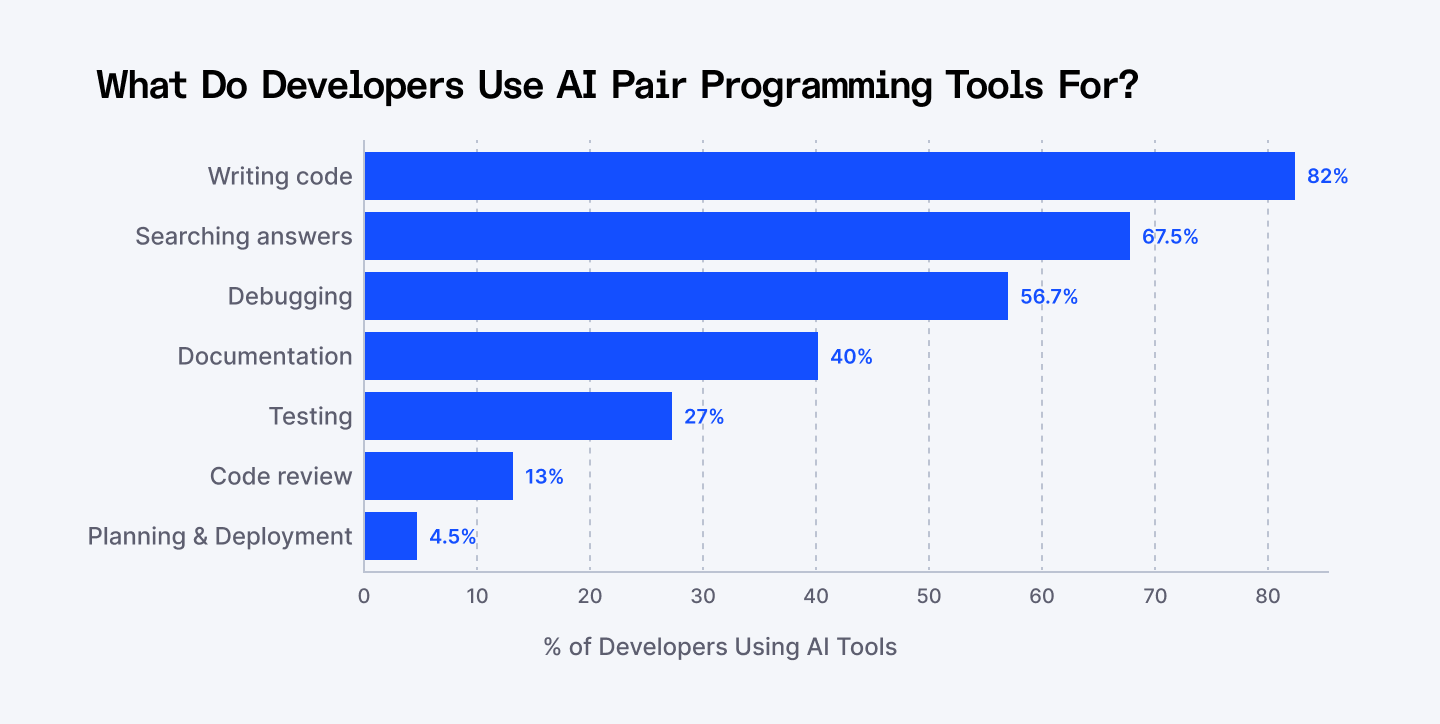
How Developers Actually Use AI Coding Agents
To get the most out of this approach, it helps to see where AI pair programming brings the highest value during daily engineering tasks:
Three Ground Rules for AI-Accelerated Learning
- Never Commit Unread Code: Treat every AI output like a Pull Request submitted by a junior engineer. Read and trace every line before merging it.
- Intentionally Break Runtime State: Pass invalid parameters, break types, or corrupt mock data on purpose. Feeding stack traces back to the agent is the fastest way to learn how the system behaves under stress.
- Keep Context Scoped: Ask for isolated modules (e.g., “Implement JWT validation middleware”) rather than broad system requests (“Build the full auth service”).
If you want to dig deeper into building healthy workflows with AI in engineering teams, check out Martin Fowler’s guide to AI-assisted software engineering and GitHub’s research on developer productivity.
Key Takeaways
- Focus on Fundamentals: Every tech stack shares core data flow, execution, and error-handling patterns.
- Orchestrate, Don’t Copy-Paste: Use AI agents to build learning sandboxes rather than relying on them to do all your thinking.
- Bridge Knowledge: Use your existing skills as a baseline to translate new concepts faster.
Frequently Asked Questions
Q: Won’t relying on AI coding agents stop me from learning deep fundamentals?
A: Only if you blindly copy-paste. When you use the agent to generate skeletal sandboxes, explain mechanics, and critique your code, you actually build deeper understanding faster through active feedback.
Q: Which AI coding agent works best for learning a new tech stack?
A: Agents with repository context and CLI integration (like Claude Code, Cursor, or Windsurf) work best because they can read local project configs, run terminal commands, and inspect compiler errors directly.
Q: How long does this 80/20 process take for a new framework?
A: By focusing strictly on core concepts and guided POC building, most developers achieve operational proficiency with a new library or tool within 3 to 5 days.