
Data pipelines often start simple.
You have a source system, you extract the data, load it into a warehouse, and run a few transformations. Everything works nicely when the dataset is small.
Then the data grows.
Your table has 10 million rows. Then 50 million. Then 500 million.
Suddenly, running the same full-load pipeline every day starts wasting time, compute, and money.
This is where incremental data loading becomes important.
Instead of processing the entire dataset every time, an incremental pipeline identifies only the new or changed records and processes those records.
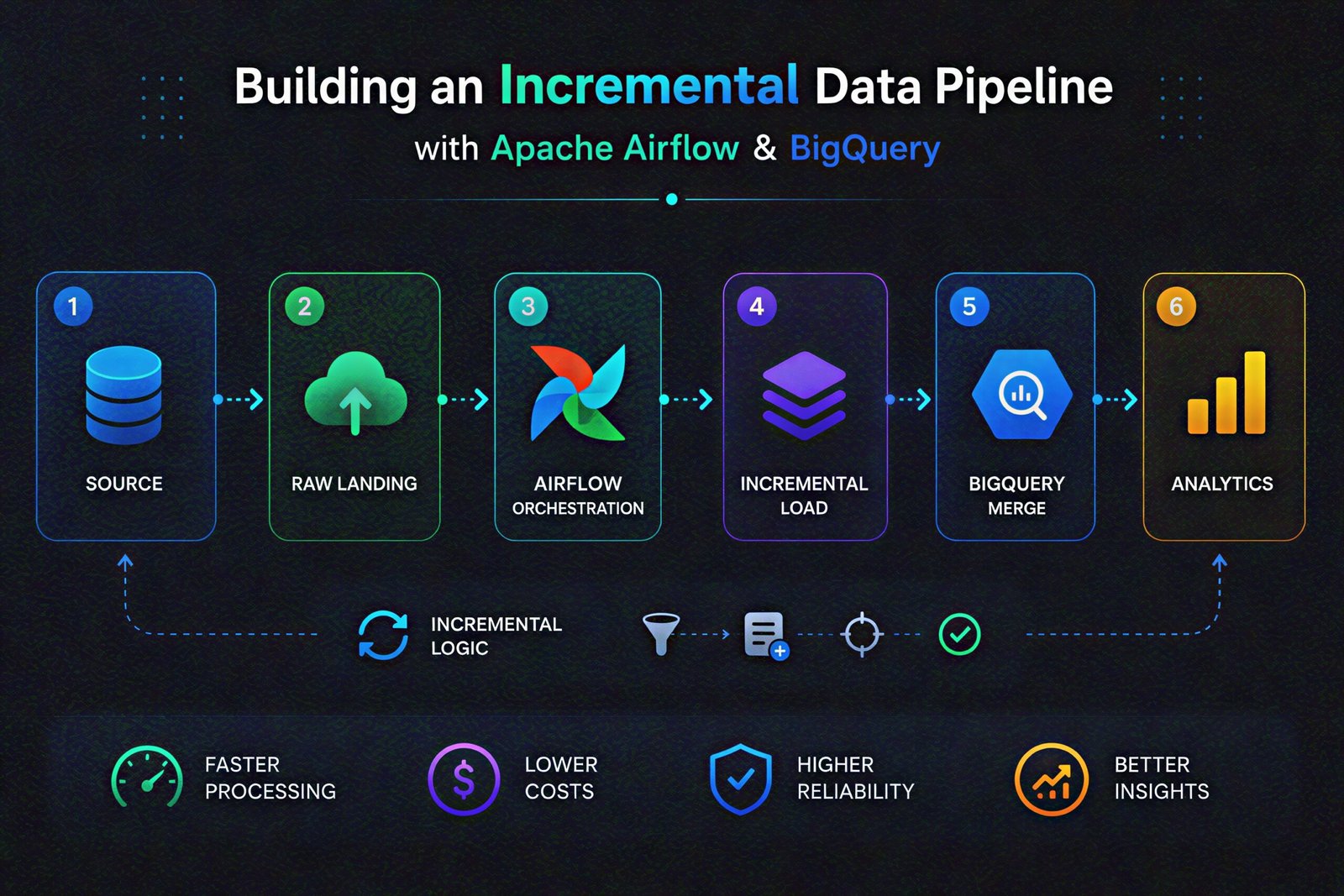
In this guide to Building Incremental Data Pipeline architectures, we’ll build a practical incremental ELT pipeline using Google Cloud Storage (GCS), Apache Airflow, and BigQuery. We’ll also explore the engineering decisions that make an incremental data pipeline reliable enough for a production environment.
The Problem With Full Data Loads
Imagine an e-commerce company receives 100,000 new or updated orders every day.
Its existing BigQuery table contains 100 million records.
A simple daily pipeline might do this:
Source
   ↓
Extract everything
   ↓
Load 100 million rows
   ↓
Transform everything
   ↓
BigQuery
But most of those 100 million records haven’t changed.
We are doing work that doesn’t need to be done.
An incremental pipeline takes a different approach:
Existing Data:       100,000,000 rows
New/Changed Data:          100,000 rows
                              ↓
                    Incremental Processing
                              ↓
                         BigQuery
The goal is simple:
Process only what changed, while keeping the target dataset correct.
What We Are Building
For this example, assume a source system produces daily order files.
The architecture looks like this:
                 ┌──────────────────┐
                 │   Source System  │
                 │  Orders / APIs   │
                 └────────┬─────────┘
                          │
                          ▼
                 ┌──────────────────┐
                 │       GCS        │
                 │   Raw Landing    │
                 └────────┬─────────┘
                          │
                          ▼
                 ┌──────────────────┐
                 │     Airflow      │
                 │   Orchestration  │
                 └────────┬─────────┘
                          │
                          ▼
                 ┌──────────────────┐
                 │ BigQuery Staging │
                 │     Table        │
                 └────────┬─────────┘
                          │
                       MERGE
                          │
                          ▼
                 ┌──────────────────┐
                 │ BigQuery Target  │
                 │  Curated Table   │
                 └──────────────────┘
Each component has a specific responsibility:
- GCS stores the raw incoming files.
- Airflow schedules and orchestrates the workflow.
- BigQuery staging temporarily holds the incremental batch.
- BigQuery target contains the final dataset.
- SQL/MERGE applies inserts and updates.
This is an ELT-style architecture because the data is loaded first and transformed inside BigQuery.
Step 1: Design the Raw Data Layer for Incremental Processing
The first rule of a reliable pipeline is:
Don’t throw away the raw data after loading it.
A simple GCS structure could be:
gs://company-data/

raw/
└── orders/
    ├── 2026-08-20/
    │   └── orders.csv
    ├── 2026-08-21/
    │   └── orders.csv
    └── 2026-08-22/
        └── orders.csv
Date-based paths make the data easier to find and replay.
If the pipeline fails for August 21, we should be able to process that day’s file again without asking the source system to regenerate it.
The raw layer therefore becomes our recovery point.
Step 2: Decide What “Incremental” Means
This is actually the most important design decision.
How will the pipeline know which records are new or changed?
There are several approaches.
Timestamp-based incremental loading
Suppose every order has:
order_id
customer_id
amount
status
updated_at
We can use updated_at to identify records that changed since the previous successful run.
For example:
Last successful timestamp:
2026-08-21 23:59:59

Load records where:

updated_at > 2026-08-21 23:59:59
This is commonly called a watermark.
The pipeline remembers where the previous successful processing ended and starts from there.
Step 3: Load Incremental Data Into a BigQuery Staging Table
Airflow can trigger a BigQuery load from GCS.
Instead of directly modifying the production table, load the batch into a staging table first:
analytics_staging.orders_incrementFor example:
GCS file
   ↓
BigQuery staging
   ↓
Validation
   ↓
MERGE
   ↓
Production table
The staging layer is useful because we can validate the incoming data before it affects the main dataset.
We can check:
- Is the file empty?
- Are required columns present?
- Are there duplicate IDs?
- Are timestamps valid?
- Are numeric fields within expected ranges?
Only after these checks pass should the data move forward.
Step 4: Use BigQuery MERGE for Incremental Updates
Now comes the heart of the incremental pipeline.
Suppose our target table is:
analytics.ordersand our incoming records are in:
analytics_staging.orders_incrementWe don’t simply append everything.
Some records may already exist but have changed.
That’s where MERGE becomes useful.
MERGE analytics.orders AS target
USING analytics_staging.orders_increment AS source
ON target.order_id = source.order_id

WHEN MATCHED THEN
  UPDATE SET
    customer_id = source.customer_id,
    amount = source.amount,
    status = source.status,
    updated_at = source.updated_at

WHEN NOT MATCHED THEN
  INSERT (
    order_id,
    customer_id,
    amount,
    status,
    updated_at
  )
  VALUES (
    source.order_id,
    source.customer_id,
    source.amount,
    source.status,
    source.updated_at
  );
The logic is straightforward:
Record exists?
       │
   ┌───┴───┐
   │       │
  YES      NO
   │       │
 UPDATE   INSERT
This lets the same pipeline handle both new records and changed records.
Step 5: Orchestrate the Incremental Data Pipeline With Airflow
Now we can turn the process into an Airflow DAG.
A practical workflow could be:
check_source_file
        ↓
load_to_staging
        ↓
validate_increment
        ↓
merge_to_bigquery
        ↓
run_quality_checks
        ↓
update_watermark
        ↓
cleanup_staging
Airflow’s job here is not to process millions of rows itself.
Its job is to make sure the right operations happen in the right order.
A simplified DAG might look like:
from airflow import DAG
from airflow.providers.google.cloud.operators.bigquery import (
    BigQueryInsertJobOperator
)
from datetime import datetime

with DAG(
    dag_id="incremental_orders_pipeline",
    start_date=datetime(2026, 1, 1),
    schedule="@daily",
    catchup=False,
) as dag:

    load_staging = BigQueryInsertJobOperator(
        task_id="load_staging",
        configuration={
            "query": {
                "query": "CALL load_orders_to_staging()",
                "useLegacySql": False,
            }
        },
    )

    merge_data = BigQueryInsertJobOperator(
        task_id="merge_orders",
        configuration={
            "query": {
                "query": "CALL merge_orders_to_target()",
                "useLegacySql": False,
            }
        },
    )

    load_staging >> merge_data
In a real project, the SQL would usually be maintained separately from the DAG rather than placing large SQL statements directly inside Python.
Make Your Incremental Data Pipeline Idempotent
Incremental pipelines introduce an important question:
What happens if the pipeline runs twice?
Imagine 100,000 records were successfully merged.
Then Airflow retries the task because of a temporary infrastructure failure.
If the pipeline simply performs an INSERT, the same records could appear twice.
That’s why incremental pipelines should be idempotent.
A correctly designed operation should be safe to retry.
Using a stable business key such as:
order_idand a MERGE operation gives us a much safer pattern.
The idea is:
First run
    ↓
Insert/update records

Retry
    ↓
Same records
    ↓
Update existing records instead of duplicating them
Retries are normal in distributed systems. Your pipeline should be designed around that reality.
Add Data Quality Checks to Your Incremental Pipeline
One of the easiest mistakes in data engineering is assuming:
Airflow task succeeded = data is correct.
Not necessarily.
A file could contain 500,000 rows when you expected 1 million.
Or every customer_id could suddenly be null.
Add validation checks after the merge.
For example:
SELECT COUNT(*)
FROM analytics.orders
WHERE order_id IS NULL;
Expected result:
0You can also check duplicates:
SELECT order_id, COUNT(*) AS record_count
FROM analytics.orders
GROUP BY order_id
HAVING COUNT(*) > 1;
These checks can become separate Airflow tasks.
If validation fails, downstream publishing or notifications can be stopped.
Partition BigQuery for Scale
Incremental loading reduces the amount of data processed, but BigQuery table design still matters.
For a large orders table, partitioning by date can significantly improve query efficiency.
For example:
orders
├── 2026-08-20
├── 2026-08-21
├── 2026-08-22
└── ...
Queries filtering on the partitioning column can avoid scanning unrelated data.
Clustering can also help when queries frequently filter or join on columns such as:
customer_id
order_id
country
The exact strategy depends on the workload, but the principle is simple:
Don’t only optimize the pipeline. Optimize the data model it produces.
What Happens When a Pipeline Fails?
A production pipeline needs a recovery strategy.
Consider this scenario:
GCS Load          ✓
Staging           ✓
Validation        ✓
MERGE             ✗
The raw file is still available in GCS.
That means we can retry the failed operation without losing the source data.
A good incremental pipeline should have:
- Retries for transient failures
- Idempotent transformations
- Clear logging
- Data quality checks
- Failure notifications
- Historical backfill support
- Raw data retention
This changes the pipeline from a simple scheduled script into a system that can actually survive operational problems.
The Complete Flow
Putting everything together:
                       SOURCE
                          │
                          ▼
                   ┌─────────────┐
                   │     GCS     │
                   │ Raw Files   │
                   └──────┬──────┘
                          │
                          ▼
                   ┌─────────────┐
                   │   Airflow   │
                   │ Orchestrate │
                   └──────┬──────┘
                          │
                          ▼
                ┌───────────────────┐
                │ BigQuery Staging  │
                │ Incremental Batch │
                └─────────┬─────────┘
                          │
                     Validation
                          │
                          ▼
                   ┌─────────────┐
                   │   MERGE     │
                   └──────┬──────┘
                          │
                          ▼
                ┌───────────────────┐
                │ BigQuery Curated  │
                │    Orders         │
                └─────────┬─────────┘
                          │
                          ▼
                    BI / Analytics
Airflow controls the workflow.
GCS preserves the source.
BigQuery performs the data processing.
And the incremental strategy prevents us from repeatedly processing data that hasn’t changed.
Final Thoughts
Incremental loading is one of those concepts that looks simple until you try to make it reliable.
The basic idea is easy:
Don’t reload everything. Process what changed.
The engineering challenge is everything around that idea – identifying changes correctly, handling updates, preventing duplicates, recovering from failures, validating data, and making the process safe to retry.
Using Apache Airflow + GCS + BigQuery gives us a strong foundation for solving that problem.
The bigger lesson is that a production data pipeline isn’t just about moving data.
It’s about building a system that can answer three questions every day:
What changed?
Did we process it correctly?
Can we safely run it again if something goes wrong?
Once those questions are built into the architecture, incremental pipelines become much easier to scale, monitor, and maintain.
Frequently Asked Questions
1. What if a record is updated after it was already processed?
The pipeline can use an updated_at column to detect changes. On the next run, the changed record is picked up and updated in BigQuery instead of creating a duplicate.
2. . How do you handle records that are deleted from the source?
Deletes can be easy to miss because incremental files usually contain new or updated records, not deleted ones.
If BigQuery needs to reflect source deletions, the pipeline should capture them using a delete flag, CDC, or a separate deletion feed. Otherwise, deleted records may remain in the warehouse even though they no longer exist in the source.
3. Is incremental loading always better than a full load?
Not necessarily. Incremental loading is usually more efficient for large datasets, but full loads can still make sense for small tables or simple workloads where reliability and simplicity matter more than processing cost.