
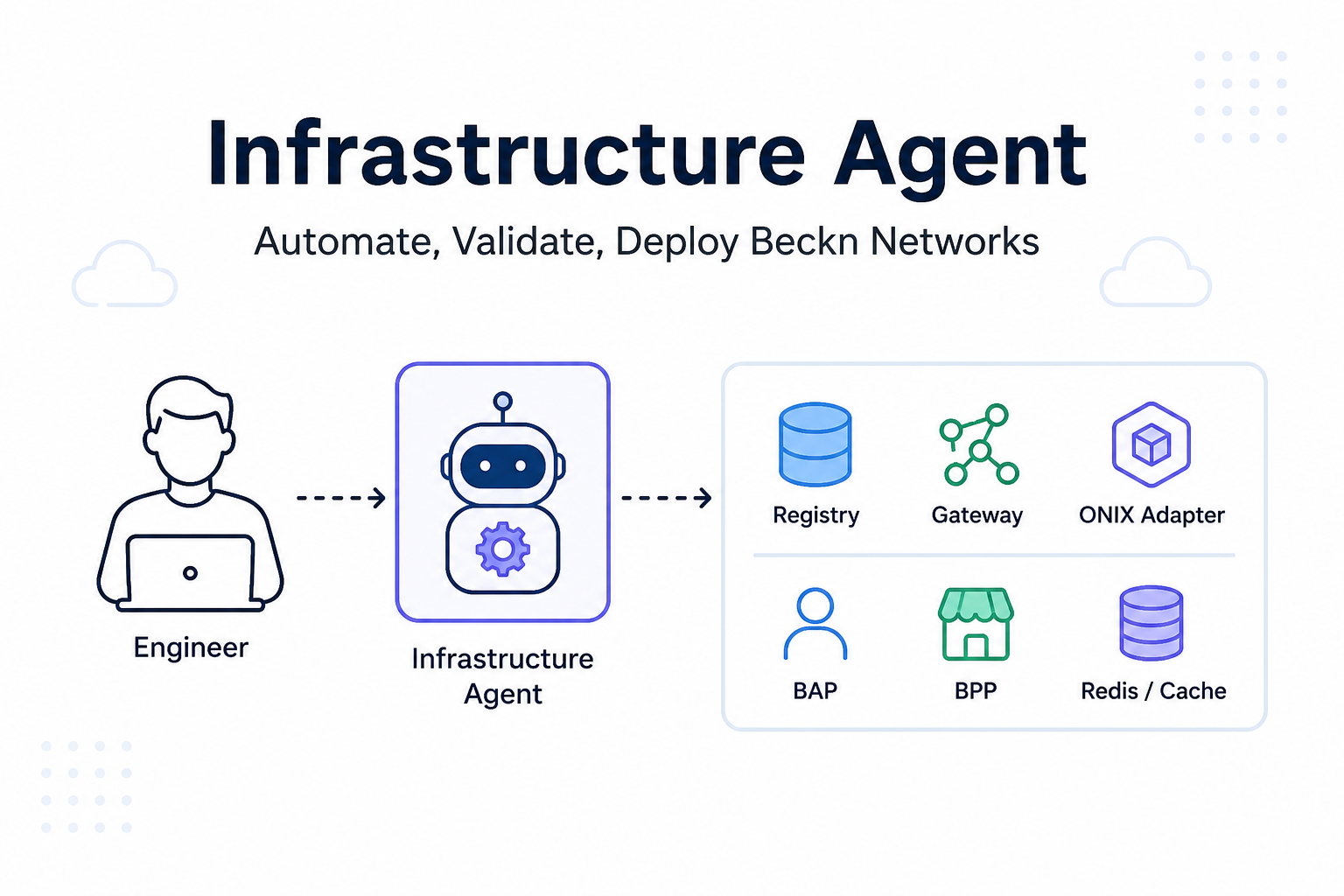
The first time I tried to bring up a Beckn network locally, I thought the hard part would be Docker.
It was not.
The containers were running. Registry was up. Gateway was reachable. ONIX adapter was forwarding requests. On paper, the network looked healthy.
Then I sent a simple search request.
curl -X POST http://localhost:8081/bap/caller/search \
  -H "Content-Type: application/json" \
  -d '{
    "context": {
      "domain": "retail:1.1.0",
      "action": "search",
      "version": "1.1.0",
      "bap_id": "bap-network",
      "bap_uri": "http://onix-adapter:8081/bap/",
      "transaction_id": "txn-test-007",
      "message_id": "msg-test-007",
      "timestamp": "2026-08-06T12:05:00.000Z"
    },
    "message": {
      "intent": {
        "item": {
          "descriptor": {
            "name": "test product"
          }
        }
      }
    }
  }'
And the gateway replied:
{"message":{"ack":{"status":"NACK"}}}No dramatic stack trace. No helpful “wrong key” message. Just a NACK.
That was the moment I realized Beckn infrastructure setup is not just about starting services. It is about making multiple services agree on identity, routing, keys, policies, and trust.
The Setup I Was Working With
A minimal Beckn network has a few important pieces:
Registry       -> stores participant identity and public keys
Gateway        -> verifies and routes network requests
ONIX Adapter   -> signs, validates, and forwards Beckn messages
BAP            -> buyer-side participant
BPP            -> provider-side participant
Redis/cache    -> stores temporary transaction data
In my local setup, the flow looked like this:
curl
  -> ONIX Adapter /bap/caller/search
  -> Gateway /bg/search
  -> Registry lookup
  -> Signature verification
  -> ACK or NACK
At first, I only checked whether containers were running:
docker psEverything looked fine.
Then I checked adapter logs:
docker logs onix-adapterThe adapter was doing its job:
addRoute
sign
forward to http://gateway:4030/bg/search
Then I checked gateway logs:
docker logs gatewayThe gateway was receiving the request and resolving a public key from registry.
Still NACK.
The Actual Bug
The issue was not routing. It was not Docker networking., It was not the search payload., It was not the BLAKE-512 digest format.
The real issue was this:
Adapter was signing with Private Key A
Registry had Public Key B
Gateway verified using Public Key B
Signature verification failed
In Beckn, every signed request has an Authorization header like this:
Signature keyId="bap-network|bap-network-key|ed25519",
algorithm="ed25519",
created="...",
expires="...",
headers="(created) (expires) digest",
signature="..."
The gateway reads:
subscriber_id = bap-network
key_id        = bap-network-key
Then it asks registry:
Give me the public key for bap-network + bap-network-keyIf that public key does not match the adapter’s private signing key, the gateway must reject the request.
That is exactly what happened.
After fixing the registry record so the public key matched the adapter’s signing key, the same search request returned:
{"message":{"ack":{"status":"ACK"}}}That ACK was not just a happy response. It proved the core trust path was working:
ONIX signed request
Gateway resolved public key
Registry returned correct key
Gateway verified signature
Gateway accepted request
Why Shell Scripts Were Not Enough
My first instinct was to automate the setup with scripts.
Start registry.—>Start gateway.—>Start adapter.—>Register-subscribers.—>Run smoke test.
That sounds fine, but it misses the real problem.
A script can tell you:
Container started successfullyBut Beckn needs more than that.
It needs to know:
Is the BAP registered?
Is the BAP using the same key registry knows about?
Is the gateway pointing to the correct registry?
Does the route for retail:1.1.0/search point to gateway?
Is the public URL correct?
Is TLS valid?
Does policy allow the request?
Does search return ACK?
Does gateway discover BPPs?
That is when I stopped thinking of this as an installation problem.
It is a validation problem.
The Agent I Wanted
I wanted an infrastructure agent that asks the right questions before generating anything:
Which cloud provider? AWS or GCP?
VM or Kubernetes?
How many VMs or nodes?
Which machine type?
What is the registry URL?
What is the gateway URL?
What are the BAP and BPP subscriber IDs?
Where are keys stored?
Which domain and protocol version?
Where should search route?
Where are logs and traces going?
Then it should generate the infrastructure and config.
For example, if I choose AWS + Kubernetes, it should generate Terraform for EKS.
If I choose GCP + VMs, it should generate Compute Engine infrastructure.
But more importantly, it should refuse unsafe deployments.
The Deployment Flow
This is the flow I want the infrastructure agent to follow:
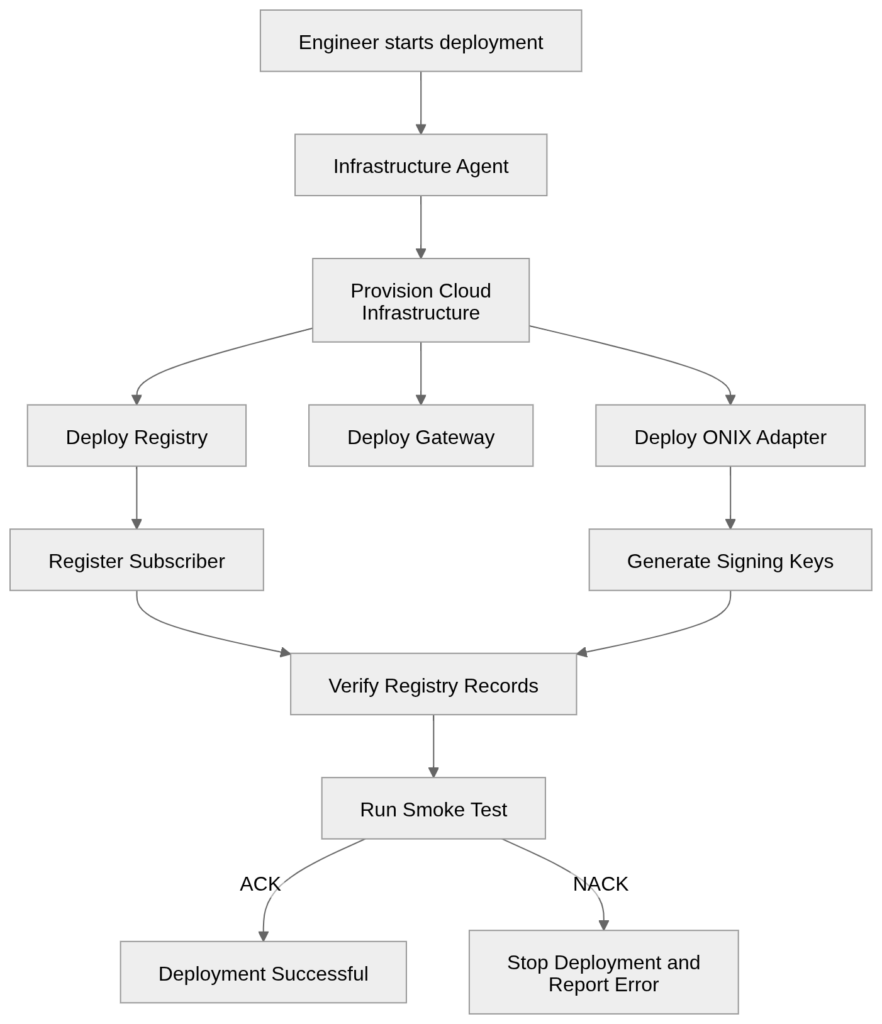
The important part is not just provisioning.
The important part is this checkpoint:
Verify Registry RecordsThat is where the agent catches the exact class of bug I hit manually.
What The Agent Should Generate
For production, I do not want a toy script.
The agent should generate real deployment artifacts:
Terraform
ONIX adapter config
Gateway config
Registry registration payloads
Routing config
Smoke test payload
Operator user guide
Rollback notes
Example command:
python3 -m tools.infra_agent init \
  --output network-intents/pune-retail-prod.yaml
Then:
python3 -m tools.infra_agent \
  --intent network-intents/pune-retail-prod.yaml \
  plan
Then:
python3 -m tools.infra_agent \
  --intent network-intents/pune-retail-prod.yaml \
  --out generated/pune-retail-prod \
  render-terraform
AWS Kubernetes setup, it can generate files like:
generated/pune-retail-prod/terraform/providers.tf
generated/pune-retail-prod/terraform/main.tf
generated/pune-retail-prod/terraform/outputs.tf
generated/pune-retail-prod/USER_GUIDE.md
The user guide matters because infra is not useful if nobody understands what got deployed.
It should say things like:
Registry runs behind https://registry.example.com/subscribers
Gateway runs behind https://gateway.example.com/bg
ONIX adapter runs behind https://adapter.example.com
BAP search goes to adapter /bap/caller/search
Adapter signs the request
Gateway verifies the request using registry
Gateway routes to subscribed BPPs
Production Guardrails
This is where the agent becomes useful.
A production-grade agent should block bad deployments.
Some rules I would never skip:
Do not paste cloud secret keys into CLI
Do not store private keys in YAML
Do not commit secrets to Git
Do not use HTTP for production public endpoints
Do not disable signature verification
Do not directly edit production registry DB
Do not deploy if registry public key does not match signer key
Do not treat ACK as full transaction success
That last one is important.
An ACK only means:
Gateway accepted the message.It does not mean:
A BPP received search
Catalog came back
The order flow works
A real deployment should test more than ACK.
Minimum:
search -> ACKBetter:
search -> ACK -> BPP receives search -> BPP sends on_search -> BAP receives catalogDifferent VMs Make This Even More Important
If everything runs on one local Docker network, debugging is manageable.
But in production, services may be split like this:
VM-1: Registry
VM-2: Gateway
VM-3: ONIX Adapter
VM-4: Redis or managed cache
VM-5: Observability stack
Now URLs matter.
Firewall rules matter.
DNS matters.
TLS matters.
Private vs public networking matters.
The agent needs to produce a service map:
BAP/client
  -> https://adapter.example.com/bap/caller/search
  -> https://gateway.example.com/bg/search
  -> https://registry.example.com/subscribers/lookup
  -> BPP subscriber URL
Without that map, people end up guessing.
And guessing is how you get silent NACKs.
Commands I Actually Want During Debugging
When something fails, I want the agent to guide me toward useful commands.
Kubernetes:
kubectl get pods -n beckn
kubectl logs deploy/gateway -n beckn
kubectl logs deploy/onix-adapter -n beckn
Registry lookup:
curl https://registry.example.com/subscribers/lookup \
  -H "Content-Type: application/json" \
  -d '{
    "subscriber_id": "bap-network",
    "unique_key_id": "bap-network-key",
    "country": "IND"
  }'
Smoke test:
curl -X POST https://adapter.example.com/bap/caller/search \
  -H "Content-Type: application/json" \
  -d @search.json
For local testing:
python3 -m tools.infra_agent \
  --intent docs/agents/beckn-infra-installation-agent/local-simple-intent.yaml \
  verify-search \
  --bap-caller-url http://localhost:8081/bap/caller
Expected:
Smoke test: PASS
Observed ACK: ACK
Things I Would Do Differently
I would validate registry records before deploying adapters.
Earlier, I deployed first and debugged later. That wasted time.
I would never let the deployment continue if the public key returned by registry does not match the adapter signing identity.
That one check would have saved hours.
I would generate subscriber IDs from one intent file instead of copying them across multiple YAML files.
Most early mistakes came from identity drift:
bap_id in payload
subscriber_id in adapter config
subscriber_id in registry
keyId in Authorization header
All of these must agree.
I would also keep generated config in Git, except secrets.
Diffing two deployments is one of the fastest ways to find mistakes.
What Changed After Building The Agent
After adding the agent workflow, the setup stopped being a memory exercise.
Instead of remembering ten manual steps, I had a flow:
init
plan
render terraform
review
apply through approved pipeline
verify search
inspect logs
handover
The most useful part was not Terraform generation.
It was the validation.
The agent now treats key consistency, routing, TLS, policy mode, and smoke testing as first-class deployment steps.
That changes the conversation with a manager too.
Instead of saying:
Containers are running.
I can say:
The network trust path is verified. The BAP signed a search request, gateway resolved the BAP key from registry, signature verification passed, and gateway returned ACK. The next checkpoint is BPP discovery and on_search callback validation.
That is a much stronger statement.
The biggest lesson for me was not that Beckn is difficult. It is that Beckn expects every participant to agree on identity before anything useful can happen.
Infrastructure is only one part of that.
The deployment agent does not replace Terraform, Kubernetes, or good engineering judgment. It sits above them and makes sure the registry, gateway, adapter, keys, routes, and policies agree before anyone sends the first real search request.
Since adding those checks, I spend a lot less time chasing mysterious NACKs and a lot more time working on actual network behavior.
References
- Beckn-ONIX repository: https://github.com/beckn/beckn-onix
- Beckn Protocol official website: https://becknprotocol.io/
- Beckn Protocol specifications: https://github.com/beckn/protocol-specifications
- Terraform documentation: https://developer.hashicorp.com/terraform/docs
- AWS EKS documentation: https://docs.aws.amazon.com/eks/
- Google Kubernetes Engine documentation: https://cloud.google.com/kubernetes-engine/docs
- Open Policy Agent documentation: https://www.openpolicyagent.org/docs/latest/
- OpenTelemetry documentation: https://opentelemetry.io/docs/
- Docker Compose documentation: https://docs.docker.com/compose/
- Kubernetes documentation: https://kubernetes.io/docs/
FAQ
What does a NACK from the Beckn gateway actually mean?
A NACK means the gateway rejected the message, usually during signature verification. It does not always come with a clear reason, so the first place to check is whether the public key in the registry matches the private key used by the adapter to sign requests.
Why does the adapter sign requests instead of sending them in plain text?
Beckn requires every request to carry a cryptographic signature so the receiving party can confirm it came from a registered participant and was not tampered with in transit. The gateway checks this signature against the public key on file in the registry before it accepts the message.
What is the difference between the registry and the gateway in a Beckn network?
The registry stores participant identity and public keys. The gateway is the component that receives incoming requests, looks up the sender’s public key from the registry, verifies the signature, and routes the request onward. They serve different jobs even though both sit early in the request path.
Is an ACK enough to confirm a deployment is working correctly?
No. An ACK only confirms the gateway accepted the message format and signature. It does not confirm that a BPP received the search request, sent back a catalog, or that the order flow works end to end. Treat ACK as the first checkpoint, not the final one.
Why did shell scripts fail to catch this kind of bug?
A shell script can confirm a container started, but it cannot confirm that the subscriber ID, signing key, and registry record all agree with each other. That kind of identity mismatch only shows up when you actually test the signed request path, not when you check if a process is running.
What is identity drift and why does it cause silent failures?
Identity drift happens when the same identifier, like a subscriber ID or key ID, gets copied across multiple config files and one copy falls out of sync with the rest. Since nothing crashes when this happens, the system just returns NACK with no clear explanation until someone traces every copy back to its source.
Should the registry public key ever be edited directly in production?
No. Editing the registry database directly bypasses the intended registration flow and makes it easy to introduce exactly the kind of key mismatch that caused the NACK described in this post. Registry updates should go through the proper registration or update API.
What should a production smoke test check beyond a single search call?
At minimum, confirm the search request returns ACK. A stronger test also confirms the BPP receives the search, sends back an on_search response, and that response reaches the BAP. Testing only the first ACK can hide failures further down the chain.
What are the exact guardrails, provider rules, and internal flow this agent runs on?
That level of detail goes beyond what’s useful in a public post, since it touches specific validation rules, provider contracts, and internal decision points built for this setup. If you’re evaluating something similar for your own Beckn network or want to walk through the exact architecture, reach out through https://www.clearleaff.com/contact-us and we can get into the specifics.